
Mileage records
Track work miles, review trips, and keep records inspectable before export.
Download and subscription access
GigClaim can be downloaded without charge from the App Store. Starting a new work session requires an active Pro subscription or an eligible introductory offer shown by Apple, so free download should not be confused with free session access.
Last reviewed: July 16, 2026
Track work miles, review trips, and keep records inspectable before export.
Mileage, trip, expense, earnings, and tax-planning records are designed to stay on your phone.
Export records only when you choose.
Inside GigClaim
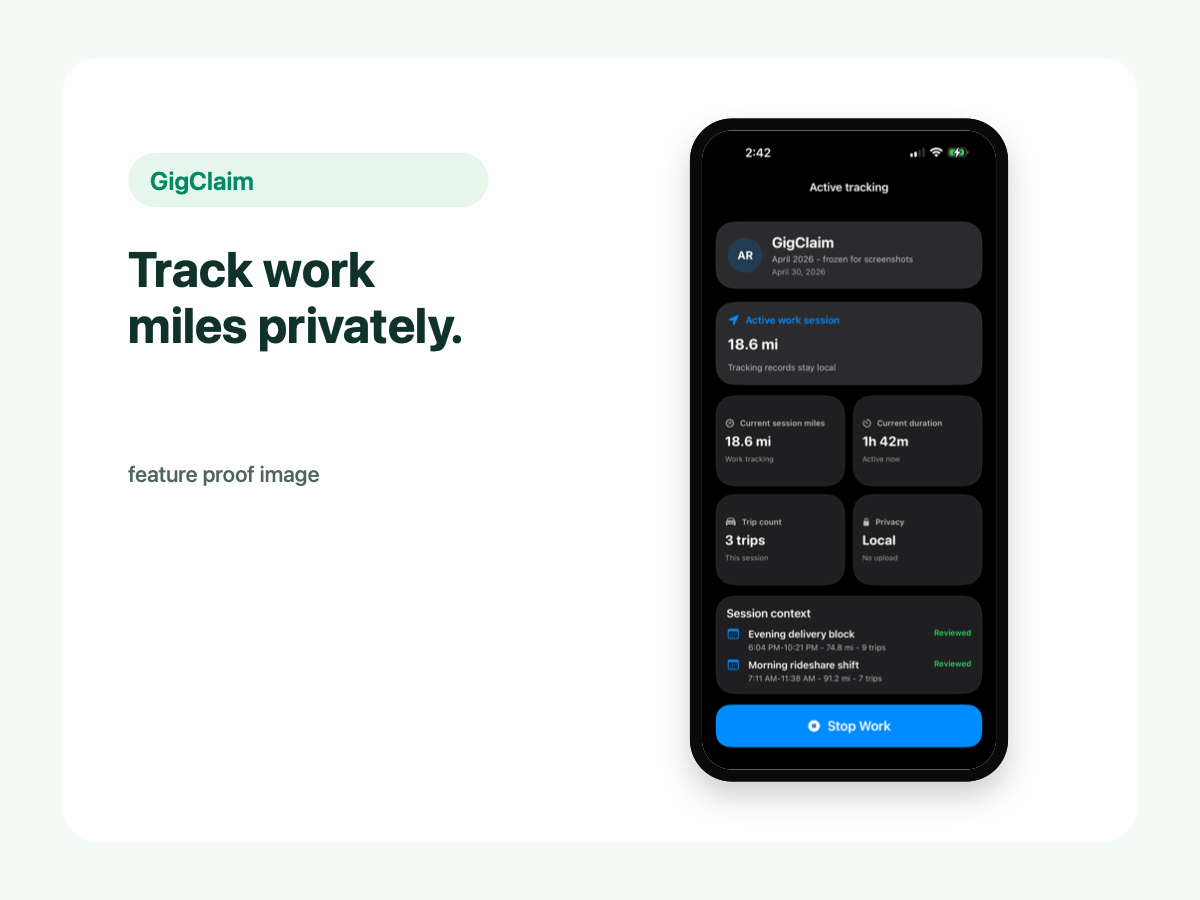
GigClaim is built around reviewable records: track the work session, inspect trips, add missed entries or notes when needed, then export only after the record makes sense.
That workflow is useful for busy delivery and rideshare days where personal errands, weak GPS, parking, tolls, or route changes can make a raw mileage total hard to trust without review.
Quick answer
Driver scenarios
Use these examples as review prompts, not tax conclusions. Your facts still matter.
Download GigClaim and review the App Store purchase terms before deciding whether the monthly or annual Pro option fits your routine.
Eligible customers may see an introductory offer from Apple. Eligibility and final terms are determined at purchase time, so the website does not promise a trial.
Compare the monthly and annual Pro options if mileage tracking is part of your regular work routine.
Free download
GigClaim can be downloaded from the App Store without charge. The download lets you inspect the app and Apple purchase flow, but it does not promise free work sessions.
Starting a new DoorDash, Uber Eats, Instacart, Grubhub, or rideshare work session requires an active Pro subscription or an eligible introductory offer shown by Apple.
GigClaim keeps a privacy-first posture: in-app driver records are designed to stay on your iPhone unless you choose to export or back them up.
Limits
Downloading the app lets you review the product and purchase terms, but it does not unlock new work sessions by itself.
Pro is intended for drivers who want work sessions, reports, exports, and local backup/export tools. Eligible customers may see an introductory offer from Apple before subscribing.
Privacy
A free mileage tracker can still collect sensitive records if it is built around cloud accounts, platform connections, or broad data collection. GigClaim's differentiator is not only price; it is the local-first workflow for driver records.
Website forms, support requests, App Store subscriptions, diagnostics, and analytics may be handled separately from in-app driver records.
Review checklist
Compare the monthly and annual prices with how regularly you expect to track work.
Check whether you can review trips weekly before the details fade.
Decide whether you need regular reports and export files for your recordkeeping workflow.
Common mistakes
The download has no charge, but starting a new work session requires Pro or an eligible Apple introductory offer.
Any mileage tracker still needs review. Check sessions, classifications, and notes while the details are fresh.
If you need regular reports, exports, or local backup bundles, compare the Pro plans and Apple purchase terms first.
Boundaries
FAQ
GigClaim is free to download. Starting a new work session requires an active Pro subscription or an eligible introductory offer shown by Apple.
No. Starting a new work session requires Pro or an eligible introductory offer shown by Apple. Apple determines eligibility and shows final terms before purchase.
No. GigClaim is designed so in-app driver records stay local on your iPhone unless you choose to export or back them up. Website, support, App Store, diagnostics, and analytics systems may be handled separately.